

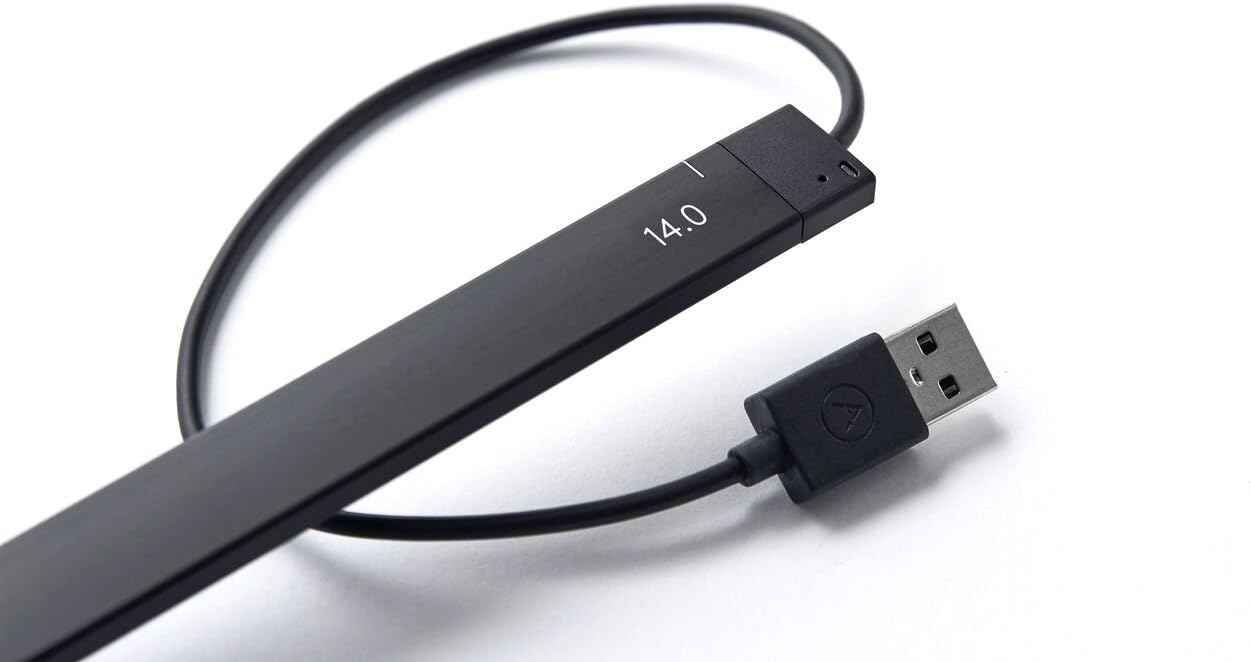


AirBar by Neonode – Add Touchscreen to 14″ Windows 10 Notebooks
Original price was: $159.99.$79.95Current price is: $79.95.
Price: $159.99 - $79.95
(as of Dec 10, 2025 18:42:51 UTC – Details)
AirBar gives your non-touch Windows 10 notebook touchscreen functionalities. The sleek, lightweight device emits an invisible light field over a laptop screen that senses your finger touch. AirBar will allow you to experience the best of Windows 10 by simply attaching it to the bottom of your laptop bezel with the magnets provided, and plugging it into the USB port. You will be able to tap, pinch, zoom, sweep and rotate instantly. AirBar for Windows 10 laptops will work out of the box not require any software or driver downloads. We call this “Plug-and-Touch”. With AirBar attached to your non-touch Windows 10 laptop, you will be able to sweep through music, images and video files, scroll whilst web browsing, or highlight text and paragraphs in your Word, and PDF documents, or pinch, zoom, rotate in your maps, and photos. You can also simply select an app on your desktop or taskbar, a hyperlink or use it to intuitively access functions in Windows 10 that you would not have otherwise, such as edge-swipes. AirBar will make using your existing laptop fun again, and increase your productivity. Many people instinctively touch their laptop screens to select something, but realize it’s not a touchscreen. Well now AirBar is your answer. AirBar is ONLY recommended to work with laptops running Windows 10, and ONLY for laptops sizes 13.3″, 14″ and 15.6″ so you must choose the RIGHT SIZE for your laptop. AirBar for Windows 10 is NOT intended for monitors, or MacBook notebooks. Please read system requirements before making a purchase.
Plug and Touch – Simply attach the AirBar with the included magnets to the bottom of your screen and plug in the USB cord
Compatibility – AirBar works with most notebooks running Windows10 with 14″ screen size
Touch Using Any Object – Touch with a finger, glove, paintbrush, stylus and more
Designed for Windows 10 Laptops
Gestures: Tap, Swipe, Pinch, Zoom, and Rotate
Note: Refer the Instructional Video before use.
Customers say
Customers find the touchscreen device easy to use and install, describing it as an amazing piece of technology. However, the functionality and touch screen capabilities receive mixed feedback – while some say it works well with Windows 7 enterprise, others report it doesn’t work properly with Toshiba laptops, and while some appreciate it as an awesome alternative for non-touchscreen computers, others find the touch screen abilities terrible. Moreover, the magnet strength is criticized for being weak and falling off laptops, and customers report that the device falls off after a day or two of use. The accuracy and value for money also receive mixed reviews, with some finding it accurate and worth the price, while others report poor accuracy and consider it not worth the cost.





Reviews
There are no reviews yet.