


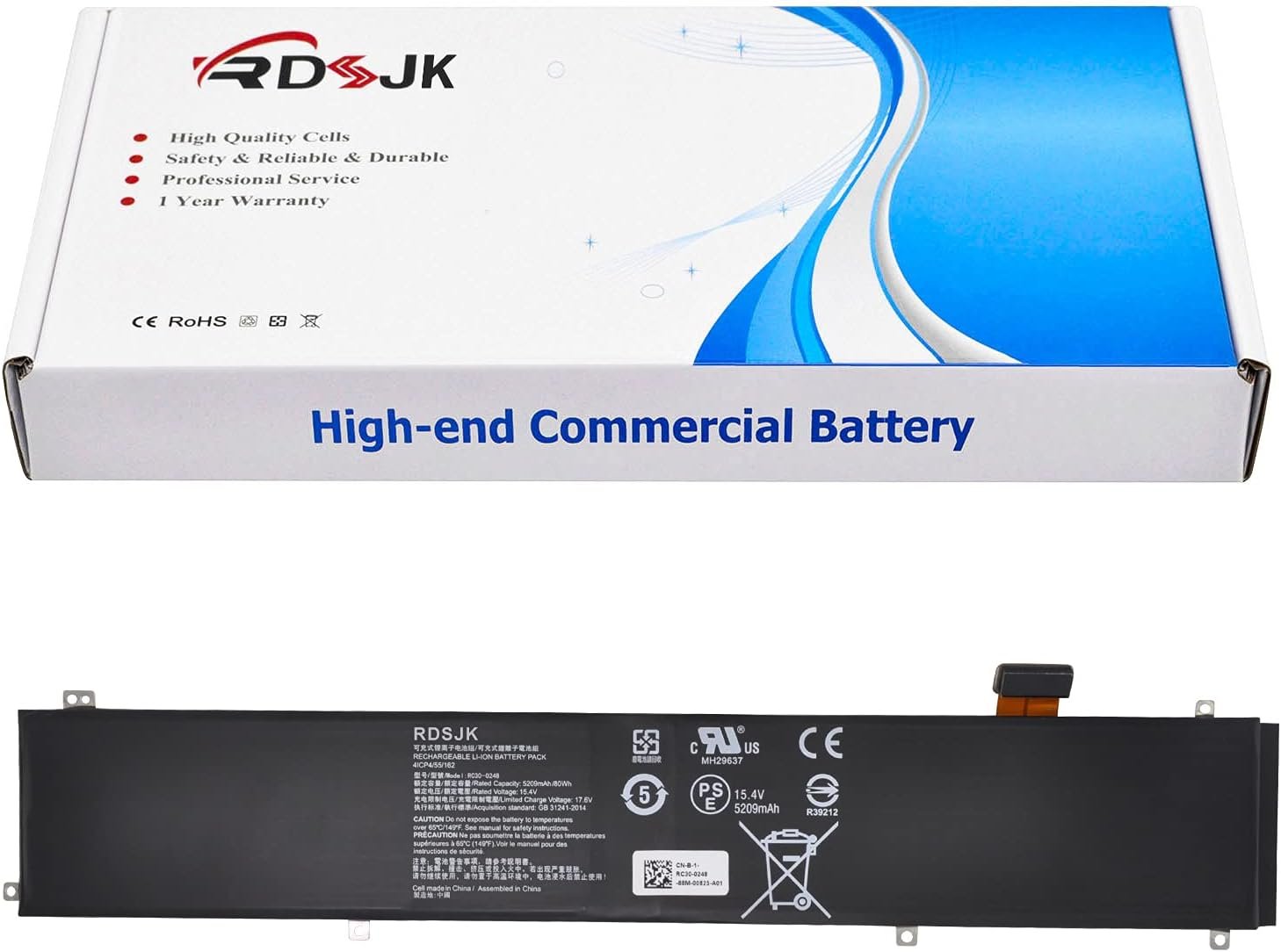





RC30-0248 Battery for Razer Blade Advanced 15 2018 2019 2020 2021 RTX 2060 2070 …
Original price was: $45.99.$39.99Current price is: $39.99.
Price: $45.99 - $39.99
(as of Jan 28, 2026 20:12:20 UTC – Details)
Product description


Specifications:
Battery Type: Li-ionVoltage: 15.4VCapacity: 80Wh/5209mAhCondition: Brand New
Replace Part Numbers:
RC30-0248 RZ09-02385 RZ09-02386 RZ09-02486 RZ09-0288 RZ09-02886 RZ09-02887 RZ09-02888 RZ09-0301 RZ09-03017 RZ09-03018 RZ09-03135 RZ09-03137 RZ09-03138 RZ09-0330 RZ09-0330x RZ09-0367 RZ09-0367x 4ICP4/55/162

How to find your laptop model?
1. Press Windows + R;2. Type “msinfo32”, then click “OK”;3. Find “System Model” in the pop-up window.
Compatible Models: (use “Ctrl+F” to find your model quickly)
Razer Blade 15 Advanced 2018 Series
Razer Blade 15 2018 512GB 144Hz Series
Razer Blade LINGREN 15(i7/256GB/GTX1060) Series
Razer Blade 15 Advanced 2018 GTX 1060/1070 (i7 8750H) Series
Razer Blade 15 Advanced RZ09-02386 RZ09-02386W91 RZ09-02386E52 RZ09-02386E91 RZ09-02386E91-R3U1 RZ09-02386E92 RZ09-02486 Series
Razer Blade 15 Advanced RZ09-02385 RZ09-02385W71-R3W1 RZ09-02385E92-R3U1 RZ09-02385E71-R3U1 Series
Razer Blade 15 Advanced 2019 Series
Razer Blade 15 2019 Advanced RTX 2060 Series
Razer Blade Advanced 15 RTX 2070 Max-Q (i7-8750H ) Series
Razer Blade 15 Advanced 2019 RTX 2080 Max-Q Series
Razer Blade 15 Advanced (i7-9750H/RTX 2080/4K P3 OLED) Series
Razer Blade 15 Advanced (GTX 1070/4K Touch) Series
Razer Blade 15 Advanced RZ09-0288 RZ09-02886 RZ09-02887 RZ09-02888 RZ09-02887E92-R3B1 Series
Razer Blade 15 Advanced RZ09-0301 RZ09-03017 RZ09-03017E01 RZ09-03017E01-R3B1 RZ09-03017E02-R3B1 RZ09-03017EM8 RZ09-03017EM8-R3U1 RZ09-03018 RZ09-03018E52 RZ09-03018E52-R3U1 RZ09-03017E02-R3B1 RZ09-03017E01-R3U1 Series
Razer Blade Advanced 15 RTX 2060 Max-Q RZ09-02886E92-R3U1 Series
Razer Blade 15 Studio Edition RZ09-03135 Series
Razer Blade 15 Advanced RZ09-03137 RZ09-03138 Series
Razer Blade 15 Advanced Model (i7-9750H, RTX 2080 Max-Q, 240 Hz) Series
Razer Blade 15 Advanced Model (i7-9750H/RTX 2070 Max-Q) FULL HD 144HZ Series
Razer Blade 15 Advanced 2020 Series
Razer Blade 15 Advanced 2020 RTX 2070 Max-Q (i7-10875H) Series
Razer Blade 15 Advanced 2020 RZ09-0330 RZ09-0330x Series
RZ09-0330QEM3-R3U1 RZ09-03304E42-R3U1 RZ09-03305E43-R3U1 RZ09-0330QEM3-R3B1 RZ09-0330QWM3-R3W1
RZ09-0330QGM3-R3G1 RZ09-03304E42-R3C1 RZ09-0330QEM3-R3E1 RZ09-03305E53-R3U1 RZ09-0330QEM3-R3J1
Razer Blade 15 Advanced 2021 Series
Razer Blade 15 Advanced 2021 RTX 3070 3080 (i7-10750H) Series
Razer Blade 15 Advanced 2021 RZ09-0367 RZ09-0367x Series
RZ09-0367CEC3-R3U1 RZ09-0367BED3-R3U1 RZ09-0367CE53-R3U1 RZ09-0367BWC3-R3W1 RZ09-0367CNC3-R3N1 RZ09-0367BWD3-R3W1 RZ09-0367BED3-R341 RZ09-0367CED3-R341 RZ09-0367CGC3-R3G1 RZ09-0367BND3-R3N1 RZ09-0367CEC3-R3E1 RZ09-0367CEC3-R3B1 RZ09-0367BGC3-R3G1 RZ09-0367BED3-R3B1 RZ09-0367BEC3-R3U1 RZ09-0367CE53-R3B1 RZ09-0367CED3-R3E1 RZ09-0367CFD3-R3F1 RZ09-0409

Laptop Battery Instruction:
1. Discharge the new battery use to 5%(not to 0%) and then charge to 95%, and cycle 3-5 times.
2. Do not disassemble, crush or puncture. Do not dispose of in fire or water.
3. If you remove battery for a long time, charge more than 80% at least one time within one months.
4. When using the battery, care should be taken to prevent exposure and moisture.

Installing A New Battery:
1. Before disassembling your laptop, put the old battery charge below 25%. If a fully charged lithium battery is accidentally punctured, it will have serious consequences.
2. Please keep every screw you removed.
3. Make sure that interface is correctly connected to its socket.
4. Please protect your screen and touchpad.

If the battery cannot be recognized by the laptop, it seems like there logic in the BIOS (ACPI) that needs to be reset with the introduction of a new battery.
1. Remove all battery drivers.
2. Remove battery.
3. Connect laptop using AC charger, double check no battery drivers installed
Connect battery.
4. Drivers will install automatically.
5. Full charge the battery by ac adapter.
6. Leave charger and let the battery drain to shut off.
Add to Cart
Add to Cart
Add to Cart
Add to Cart
Add to Cart
Add to Cart
Customer Reviews
4.0 out of 5 stars 10
3.9 out of 5 stars 13
4.7 out of 5 stars 3
3.0 out of 5 stars 2
—
1.8 out of 5 stars 2
Price
$29.99$29.99 $39.99$39.99 $36.99$36.99 $29.99$29.99 $22.99$22.99 $45.99$45.99
Compatible Laptop Models
Razer Blade Stealth 2016 i7-7500U 12.5″ 2017 i7-7500U I7-8550U 13.3″ Series Razer Blade Advanced 15 2018 2019 2020 2021 Series Razer Blade 15 Base 2018 2019 Series Razer Blade Stealth 13 2018 2019 2020 Series Razer Blade 15 Edition 2020 2021 i7-10750H RTX 3060 Series Razer Blade 14″ 2021 2022 Series
Voltage
11.55V 15.4V 15.4V 11.55V 15.4V 15.4V
Capacity
4640mAh/53.6Wh 5209mAh/80Wh 4221mAh/65Wh 4602mAh/53.1Wh 4221mAh/65Wh 4003mAh/61.6Wh
Battery type
Li-ion Li-ion Li-ion Li-ion Li-ion Li-ion
Over-Temperature Protection
✓
✓
✓
✓
✓
✓
Over-Voltage Protection
✓
✓
✓
✓
✓
✓
Over-Current Protection
✓
✓
✓
✓
✓
✓
Over-Charge Protection
✓
✓
✓
✓
✓
✓
Over-Discharge Protection
✓
✓
✓
✓
✓
✓


Battery type: Li-ion; Voltage: 15.4V; Capacity: 80Wh/5209mAh
Compatible Models: Razer Blade 15 Advanced 2018 GTX 1060 LINGREN 15(i7 8750H) RZ09-02385 RZ09-02385W71-R3W1 RZ09-02385E92-R3U1 RZ09-02386 RZ09-02386E91 RZ09-02386E91-R3U1, Razer Blade Advanced 15 2019 RZ09-0288 RZ09-02886 RZ09-02887 RZ09-02888 RZ09-02887E92-R3B1 RZ09-0301 RZ09-03017 RZ09-03018 RZ09-03017E02-R3B1 RZ09-03137 RZ09-03138, Razer Blade 15 Studio Edition RZ09-03135 Series, Razer Blade Advanced 15 2019 RTX 2070 Max-Q (i7-8750H )Series, Razer Blade 15 Advanced 2021 Series RZ09-0367BGC3-R3G1 RZ09-0367BED3-R3B1 RZ09-0367BEC3-R3U1 RZ09-0367CE53-R3B1 RZ09-0367CED3-R3E1 RZ09-0367CFD3-R3F1 RZ09-0367BND3-R3N1 RZ09-0367CEC3-R3E1 RZ09-0367CEC3-R3B1, Razer Blade LINGREN 15(i7/256GB/GTX1060)
Compatible Models: Razer Blade 15 Studio Edition 2020 i7-10875H RTX 5000 Max-Q RZ09-0330Q Series, Razer Blade 15 Advanced 2020 i7-10875H RTX 2080 SUPER Max-Q Series, Razer Blade 15 Advanced 2020 RZ09-0330 RZ09-0330x Series RZ09-0330QEM3-R3U1 RZ09-03304E42-R3U1 RZ09-03305E43-R3U1 RZ09-0330QEM3-R3B1 RZ09-0330QWM3-R3W1 RZ09-0330QGM3-R3G1 RZ09-03304E42-R3C1 RZ09-0330QEM3-R3E1 RZ09-03305E53-R3U1 RZ09-0330QEM3-R3J1, Razer Blade 15 Advanced 2021 i7-10875H RTX 3070 3080 Series, Razer Blade 15 Advanced 2021 RZ09-0367 RZ09-0367x Series RZ09-0367CEC3-R3U1 RZ09-0367BED3-R3U1 RZ09-0367CE53-R3U1 RZ09-0367BWC3-R3W1 RZ09-0367CNC3-R3N1 RZ09-0367BWD3-R3W1, Razer Blade 15 2018 512GB 144Hz Series
Replace Part Numbers: RC30-0248 RZ09-02385 RZ09-02386 RZ09-0238x RZ09-02486 RZ09-0288 RZ09-02886 RZ09-02887 RZ09-02888 RZ09-0301 RZ09-03017 RZ09-03018 RZ09-03135 RZ09-03137 RZ09-03138 RZ09-0330 RZ09-0330x RZ09-0330Q RZ09-0367 RZ09-0367x RZ09-0409 RZ09-0409x 4ICP4/55/162 4ICP4/56/162
100% New from Manufacturer. Up to 500 recharge cycles over the life of the battery. The actual operation time will depend on how much electricity is required by the device and how you use it
For first use, please discharge the battery to 5%(not to 0%) and then charge to 95%, and cycle 3-4 times


Related products


Alienware 16 Aurora Gaming Laptop AC16250-16″ WQXGA 120Hz Display, Intel Core 7-…

Alienware 16 Aurora Laptop AC16250-16-inch 16:10 WQXGA Display, Intel Core 7-240…


Alienware Aurora Gaming Desktop ACT1250 – Intel Core Ultra 7 265F, 32GB DDR5 RAM…


Alienware Aurora Gaming Desktop ACT1250 – Intel Core Ultra 7 265KF Processor, Li…


ASUS ROG Strix G16 (2025) Gaming Laptop, 16” ROG Nebula Display 16:10 2.5K 240Hz…


Dell G16 7630 Gaming Laptop, 16″ QHD+ 2.5K 240Hz 3ms, Intel i9-13900HX(Up to 5.4…


MSI Thin 15 15.6” 144Hz FHD Gaming Laptop: Intel Core i7-13620H, NVIDIA Geforce …

Reviews
There are no reviews yet.